from fastcore.test import *
from fastcore.utils import *

from pprint import pprintAPI
API for ipykernel-helper
InteractiveShell helpers
InteractiveShell.xpush
def xpush(
    interactive:bool=False, **kw
):
Like push, but with kwargs
ipy = get_ipython()ipy.push(dict(a=2))
a2# ipykernel_helper version uses `**kwargs`
ipy.xpush(a=3)
a3The main benefits of using ipy.push(dict(a=2)) over directly executing code are:
- Bulk variable assignment - You can set multiple variables at once with a single command
- Programmatic variable injection - It provides a way to inject variables into the namespace from another context or function
- No execution history - Variables are added without creating an entry in the execution history
- No side effects - It’s a “pure” namespace modification without executing any code that might have side effects
There are several interesting functions in the IPython interpreter object that are useful for notebook development and interactive computing:
reset/reset_selective- Clear variables from the namespace (either all or selectively)run_cell/run_cell_async- Execute code in a cell programmaticallyset_next_input- Programmatically set the content of the next cellsystem/system_raw/system_piped- Execute shell commands with different output handlingrun_line_magic/run_cell_magic- Execute IPython magics programmaticallyset_custom_exc- Set custom exception handlers
Displaying MIME data
transient
def transient(
    data:str='', subtype:str='plain', mimetype:str='text', meta:NoneType=None, update:bool=False, **kw
):transient('hi there', foo='bar')hi theretransient('*hi* **there**', subtype='markdown')hi there
run_cmd
def run_cmd(
    cmd, data:str='', meta:NoneType=None, update:bool=False, **kw
):
read_url et al
_md = 'An alt text with escape chars\n![\[Uncaptioned image\]](https://www.example.org)'Running the following will crash solveit:
# DON'T RUN!
# md_bundle = { 'text/markdown': md}
# ipy.display_pub.publish(data=md_bundle)
This happens because EscapeSequence isn’t handled correctly inside FrankenRenderer.render_image and raises an exception. We fix this by replacing the escape characters in the image alt-text:
cts = _absolutify_imgs(_md, '')
md_bundle = { 'text/markdown': cts }
ipy.display_pub.publish(data=md_bundle)
An alt text with escape chars
get_md
def get_md(
    html, url:str='', mmode:NoneType=None, ignore_links:bool=False, ignore_images:bool=False, mark_code:bool=True
):
Convert HTML to markdown with absolute image URLs and optional math mode
scrape_url
def scrape_url(
    url
):scrape_url('http://www.example.org').encoding'utf-8'read_url
def read_url(
    url:str, # URL to read
    as_md:bool=True, # Convert HTML to markdown
    extract_section:bool=True, # Extract section matching URL fragment or selector
    selector:str=None, # CSS selector to extract specific content
    ai_img:bool=False, # Add #ai suffix to image URLs
):
Read url from web
print(read_url('https://www.example.org'))# Example Domain
This domain is for use in documentation examples without needing permission. Avoid use in operations.
[Learn more](https://iana.org/domains/example)print(read_url('https://www.example.org', as_md=False, selector='body'))<html><body><div><h1>Example Domain</h1><p>This domain is for use in documentation examples without needing permission. Avoid use in operations.</p><p><a href="https://iana.org/domains/example">Learn more</a></p></div></body></html>print(read_url('https://caddyserver.com/docs/running#unit-files'))### Unit Files
We provide two different systemd unit files that you can choose between, depending on your use case:
* [**`caddy.service`**](https://github.com/caddyserver/dist/blob/master/init/caddy.service) if you configure Caddy with a [Caddyfile](/docs/caddyfile). If you prefer to use a different config adapter or a JSON config file, you may override the `ExecStart` and `ExecReload` commands.
* [**`caddy-api.service`**](https://github.com/caddyserver/dist/blob/master/init/caddy-api.service) if you configure Caddy solely through its [API](/docs/api). This service uses the [`--resume`](/docs/command-line#caddy-run) option which will start Caddy using the `autosave.json` which is [persisted](/docs/json/admin/config/) by default.
They are very similar, but differ in the `ExecStart` and `ExecReload` commands to accommodate the workflows.
If you need to switch between the services, you should disable and stop the previous one before enabling and starting the other. For example, to switch from the `caddy` service to the `caddy-api` service:
````
sudo systemctl disable --now caddy
sudo systemctl enable --now caddy-api
````html2text removes new lines so we only use get_md on html content and static text/markdown content is returned as is with new lines preserved:
print('\n'.join(read_url('https://fastht.ml/docs/llms.txt').splitlines()[:5]))# FastHTML
> FastHTML is a python library which brings together Starlette, Uvicorn, HTMX, and fastcore's `FT` "FastTags" into a library for creating server-rendered hypermedia applications. The `FastHTML` class itself inherits from `Starlette`, and adds decorator-based routing with many additions, Beforeware, automatic `FT` to HTML rendering, and much more.
Things to remember when writing FastHTML apps:read_url renders latex based on the solveit user’s katex setting (USE_KATEX)
os.environ['USE_KATEX']='dollar'
print(read_url('https://arxiv.org/html/1706.03762v7',selector='#S3\.SS2\.SSS1')[:700])
#### 3.2.1 Scaled Dot-Product Attention
We call our particular attention "Scaled Dot-Product Attention" (Figure 2). The input consists of queries and keys of dimension $d_{k}$, and values of dimension $d_{v}$. We compute the dot products of the query with all keys, divide each by $\sqrt{d_{k}}$, and apply a softmax function to obtain the weights on the values.
In practice, we compute the attention function on a set of queries simultaneously, packed together into a matrix $Q$. The keys and values are also packed together into matrices $K$ and $V$. We compute the matrix of outputs as:
| $$\mathrm{Attention}(Q,K,V)=\mathrm{softmax}(\frac{QK^{T}}{\sqrt{d_{k}}})V$$ | | (1)
---|---|---|--- os.environ['USE_KATEX']='1'
print(read_url('https://arxiv.org/html/1706.03762v7',selector='#S3\.SS2\.SSS1')[:700])#### 3.2.1 Scaled Dot-Product Attention
We call our particular attention "Scaled Dot-Product Attention" (Figure 2). The input consists of queries and keys of dimension \(d_{k}\), and values of dimension \(d_{v}\). We compute the dot products of the query with all keys, divide each by \(\sqrt{d_{k}}\), and apply a softmax function to obtain the weights on the values.
In practice, we compute the attention function on a set of queries simultaneously, packed together into a matrix \(Q\). The keys and values are also packed together into matrices \(K\) and \(V\). We compute the matrix of outputs as:
| $$\mathrm{Attention}(Q,K,V)=\mathrm{softmax}(\frac{QK^{T}}{\sqrt{d_{k}}})V$$ | | (1)
---|Relative image paths are automatically corrected as well:
print(read_url('https://arxiv.org/html/1706.03762v7',selector='#Sx1')[:700])## Attention Visualizations
 Figure 3: An example of the attention mechanism following long-distance dependencies in the encoder self-attention in layer 5 of 6. Many of the attention heads attend to a distant dependency of the verb ‘making’, completing the phrase ‘making…more difficult’. Attentions here shown only for the word ‘making’. Different colors represent different heads. Best viewed in color.

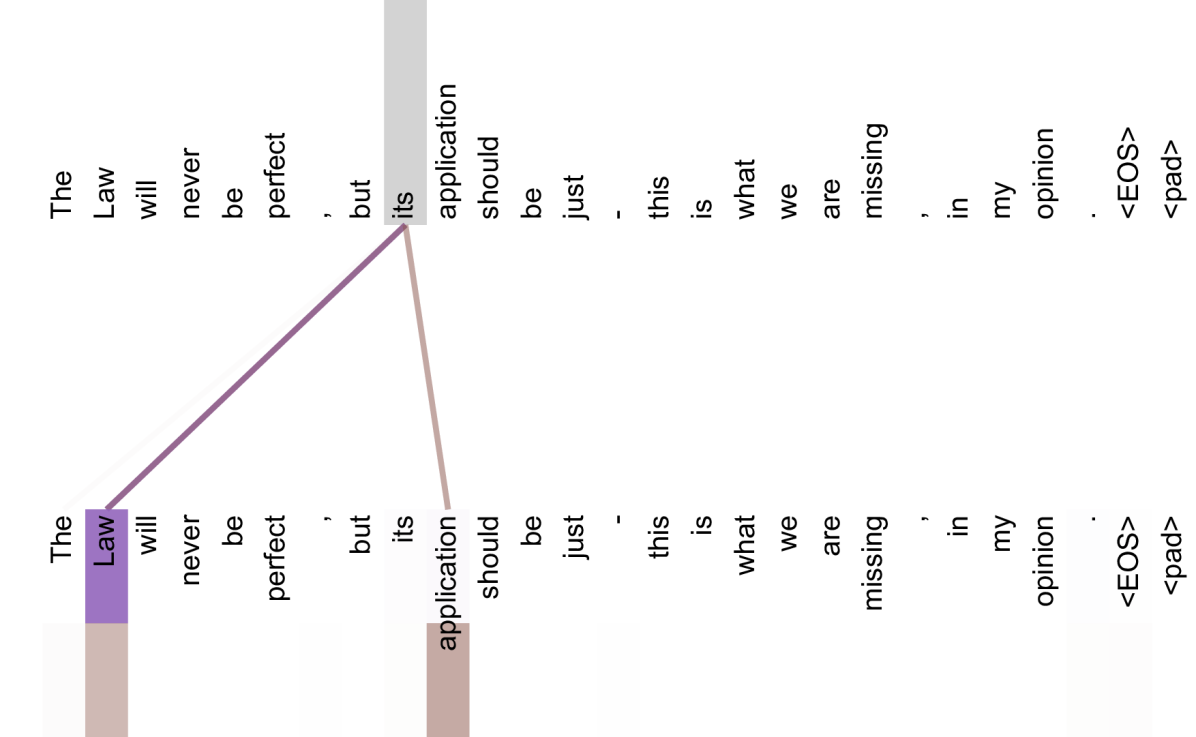
Figure 4: Two attention heads, also in layer 5 of 6, apparently involved in anaphora resolution. Topprint(read_url('https://arxiv.org/html/1706.03762v7',selector='#Sx1',ai_img=True)[:700])## Attention Visualizations
 Figure 3: An example of the attention mechanism following long-distance dependencies in the encoder self-attention in layer 5 of 6. Many of the attention heads attend to a distant dependency of the verb ‘making’, completing the phrase ‘making…more difficult’. Attentions here shown only for the word ‘making’. Different colors represent different heads. Best viewed in color.

Figure 4: Two attention heads, also in layer 5 of 6, apparently involved in anaphora resoluOther helpers
fix_editable_priority
def fix_editable_priority():DisplayFormatter.format
def format(
    obj, include:NoneType=None, exclude:NoneType=None
):
class Foo:
def _repr_markdown_(self): return "1. hi\n2. bye"
Foo()- hi
- bye
Markdown("1. hi\n2. bye")- hi
- bye
from pandas import DataFrame
import pandas.io.formats.style
df = DataFrame({'a':[1,2,3], 'b':[4,5,6]})
df| a | b | |
|---|---|---|
| 0 | 1 | 4 |
| 1 | 2 | 5 |
| 2 | 3 | 6 |
df.style.set_properties(color='red'
).set_table_styles([dict(selector='th', props='font-style: italic')])| a | b | |
|---|---|---|
| 0 | 1 | 4 |
| 1 | 2 | 5 |
| 2 | 3 | 6 |
DisplayObject.__repr__
def __repr__():Return repr(self).
DisplayObject.__init__ treats a data string as a URL to download if it starts with http, or as a filename to load if a file of that name exists on disk. This is undocumented, and it trips up the text display types: Markdown(s) where s happens to start with https:// tries to fetch s as a web page and errors. We drop that guesswork for TextDisplayObject (the base of Markdown, HTML, Latex, Math, and friends), so text is always treated as text. Passing url= or filename= explicitly still works, since reload() is unchanged.
TextDisplayObject.__init__
def __init__(
    data:NoneType=None, url:NoneType=None, filename:NoneType=None, metadata:NoneType=None
):
Like DisplayObject.__init__, but never auto-detects data as a URL/filename
call_tool
async def call_tool(
    func, kw
):
Call func(**kw) with coerce_inputs
Handles async:
async def async_add(a:int, b:int): return a+b
test_eq(await call_tool(async_add, {'a':2, 'b':3}), 5)
string → list coercion via coerce_inputs:
coerce_inputs??def coerce_inputs(func, inputs):
"Coerce inputs based on function type annotations, repairing common LLM container mistakes"
hints = get_type_hints(func) if hasattr(func, '__annotations__') else {}
sig, res = inspect.signature(func), {}
for k,v in inputs.items():
ann = hints.get(k)
if v is None and (p := sig.parameters.get(k)) and p.default is not empty: continue
if ann in custom_types: res[k] = ann(v); continue
cont, arr = _ann_outer(ann, (dict,list,tuple,set)), _ann_outer(ann, (list,tuple,set))
if cont and isinstance(v, str) and not _allows_str(ann):
try: v = ast.literal_eval(v)
except Exception: pass
if arr and v == {}: v = []
elif arr and isinstance(v, str) and not _allows_str(ann): v = [v]
if isinstance(v, dict) and callable(ann): res[k] = ann(**v)
else: res[k] = v
return resFile: ~/aai-ws/toolslm/toolslm/funccall.py; line: 206
def join_items(xs:list[str], sep:str=','): return sep.join(xs)

test_eq(await call_tool(join_items, {'xs':"['a','b','c']", 'sep':'/'}), 'a/b/c')
Extension
flexiclass?def flexiclass(
cls, # The class to convert
)->dataclass:
"Convert `cls` into a `dataclass` like `make_nullable`. Converts in place and also returns the result."File: ~/aai-ws/fastcore/fastcore/xtras.py; line: 1003
Type: function
flexiclass??def flexiclass(
cls # The class to convert
) -> dataclass:
"Convert `cls` into a `dataclass` like `make_nullable`. Converts in place and also returns the result."
if is_dataclass(cls): return make_nullable(cls)
for k,v in get_annotations_ex(cls)[0].items():
if not hasattr(cls,k) or getattr(cls,k) is MISSING:
setattr(cls, k, field(default=UNSET))
return dataclass(cls, init=True, repr=True, eq=True, order=False, unsafe_hash=False, frozen=False)File: ~/aai-ws/fastcore/fastcore/xtras.py; line: 1003
def f(a:int=0 # aa
): pass
@delegates(f)
def g(
b:int, # bb
**kwargs
)->int: # Returns the meaning of life
"The g function"
# nothing to see here
passg?def g(
b:int, # bb
a:int=0, # aa
)->int: # Returns the meaning of life
"The g function"File: /var/folders/51/b2_szf2945n072c0vj2cyty40000gn/T/ipymini_57881/3905198878.py; line: 4
Type: function
g??@delegates(f)
def g(
b:int, # bb
**kwargs
)->int: # Returns the meaning of life
"The g function"
# nothing to see here
passFile: /var/folders/51/b2_szf2945n072c0vj2cyty40000gn/T/ipymini_57881/3905198878.py; line: 4
info_md
def info_md(
obj:str | object, # Object to get info for, or its name
source:bool=False
):With source=False same as ipython’s ?, otherwise same as ??
info_md(flexiclass)````python
def flexiclass(
    cls, # The class to convert
)->dataclass:
    "Convert `cls` into a `dataclass` like `make_nullable`. Converts in place and also returns the result."
````
**File:** `~/aai-ws/fastcore/fastcore/xtras.py`; line: 1003
**Type:** functionres = info_md(flexiclass)
assert re.search(r':\n "', res) # docstring indented as function body
assert f'````\n{flexiclass.__doc__}\n````' not in res # not repeated as a separate blockinfo_md also works on instances (reporting their type’s info), builtins, and other objects with no retrievable source:
res = info_md(Path('.'))
assert 'PosixPath' in res and 'pathlib' in res
assert 'class PosixPath' in info_md(Path('.'), source=True)
Markdown(res)
PosixPath instance: Path('.')
"Path subclass for non-Windows systems.
On a POSIX system, instantiating a Path should return this object."String form: .
File: ~/.local/share/uv/python/cpython-3.13-macos-aarch64-none/lib/python3.13/pathlib/_local.py; line: 839
Type: PosixPath
Markdown(info_md(len))def len(
obj
):
"Return the number of items in a container."Type: builtin_function_or_method
Workaround for error where non str evalue causes a crash:
SyntaxTB.structured_traceback
def structured_traceback(
    etype, # Type of the exception raised.
    evalue, # Data stored in the exception
    etb, # If list: List of frames, see class docstring for details.
    # If Traceback: Traceback of the exception.
    tb_offset:NoneType=None, # Number of frames in the traceback to skip.  If not given, the
    # instance evalue is used (set in constructor).
    context:int=5, # Number of lines of context information to print.
):
Return a color formatted string with the traceback info.
Parameters
etype : exception type Type of the exception raised. evalue : object Data stored in the exception etb : list | TracebackType | None If list: List of frames, see class docstring for details. If Traceback: Traceback of the exception. tb_offset : int, optional Number of frames in the traceback to skip. If not given, the instance evalue is used (set in constructor). context : int, optional Number of lines of context information to print.
Returns
String with formatted exception.
Workaround for error where non str __file__ causes a crash:
load_ipython_extension
def load_ipython_extension(
    ip
):
The extension also stamps every displayed result’s type name into its output metadata as __type, letting a client rebuild str subclasses such as Safe from plain wire text. The stamp comes from the displayhook’s own result, never from _: IPython stops updating _ forever once user code assigns it (an ordinary for _ in ... suffices), and a stamp read from _ would silently mislabel every result after that.
ip = get_ipython()
load_ipython_extension(ip)
r = ip.run_cell_magic('time', '', 'pass')
test_eq(inspect.iscoroutine(r), False)
assert 'await' in ip.input_transformer_manager.transform_cell('%time pass')  # magics now awaitable via fastcore.aio.enable_async_magics
ip.user_ns['_'] = ''
fd,md = ip.displayhook.compute_format_data(123)
test_eq(md['__type'], 'int')