BasedTab

Based Tabular Data

Usage

Installation

For development:

git clone https://github.com/AnswerDotAI/basedtab.git
pip install -e .

Install latest from the GitHub repository:

$ pip install git+https://github.com/AnswerDotAI/basedtab.git

or from conda

$ conda install -c AnswerDotAI basedtab

or from pypi

$ pip install basedtab

How to use

Load data

read_csv and save_csv

from basedtab.core import *
from nbdev.config import get_config

data_path = str(get_config().config_path/'data/toy.csv')
bf = BFrame.read_csv(data_path)
bf.head(3).df
Number City Gender Age Income Illness
0 1 Dallas Male 41 40367.0 No
1 2 Dallas Male 54 45084.0 No
2 3 Dallas Male 42 52483.0 No

Groupby

from basedpl import add, tally, square
MEAN = add.reduce_first / tally
bf.groupby("City", "Income", mean=MEAN).df.astype(int)
Income
Dallas mean 45252
New York City mean 96857
Los Angeles mean 95264
Mountain View mean 135078
Boston mean 91554
Washington D.C. mean 70991
San Diego mean 100756
Austin mean 90277
RMSE = MEAN.under(square)
bf.head(100).groupby("Gender", ["Age", "Income"], mean=MEAN, rmse=RMSE)
┌→───────────────────────────┐
↓"Male"⌷                     │
↓             Age      Income│
│mean 44.57407407 48301.42593│
│rmse 45.66970793 49632.10639│
│                            │
│"Female"⌷                   │
│             Age      Income│
│mean 45.30434783 39739.36957│
│rmse 46.73468128 40738.65853│
└~───────────────────────────┘

Rolling

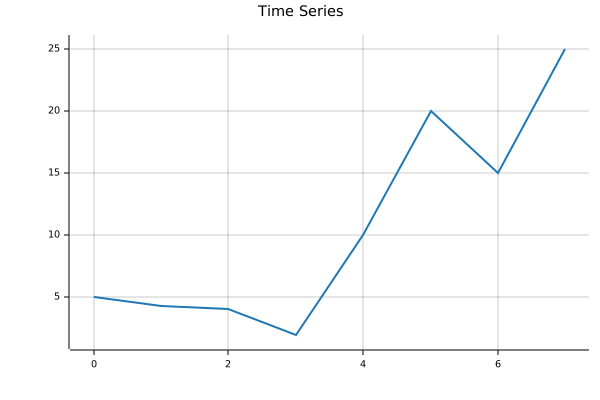
ts = BFrame(dict(price=[5,4.3,4.1,2,10,20,15,25]))
ts.rolling("price", size=2, step=2, mean=MEAN).df
price
0 mean 4.65
1 mean 3.05
2 mean 15.00
3 mean 20.00

Plot

ts.plot(title="Time Series")

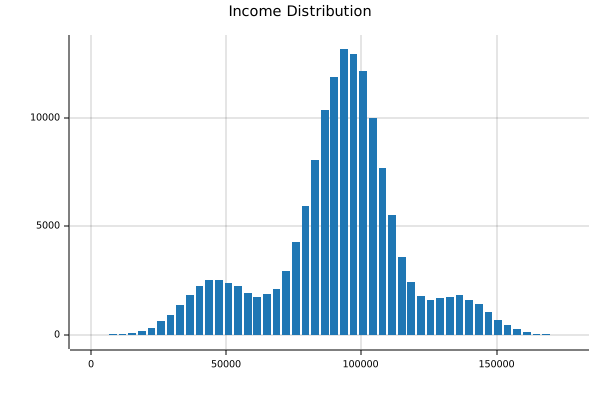
bf["Income"].hist(title="Income Distribution")