Build XML element trees, serialize them, and display HTML, SVG and images in notebooks
Elements
]help •element
•element — XML elements
•element tag returns an element function for the XML tag tag. Call it with attributes on the left and children on the right, as in ["r":10] circle "". An empty right argument, "" or ⍬, gives no children. The result is a keyed vector with tag, attrs and children entries. Notebooks display it as HTML. In that HTML, the text of a script or style element isn’t escaped, as browsers require. A script element can hold JavaScript for the page. XML and SVG covers element trees.
Errors: DOMAIN for invalid tag or attribute names.
Here span makes HTML span elements. The result is an ordinary keyed vector. A notebook displays it as HTML, with its style attribute applied:
span←•element"span"label←["style":"color:steelblue;font-size:1.5em"] span "a < b"label
a < b
Given a list of names, •element makes one function for each. [ul li]← names both. Children can be a vector of elements:
[ul li]←•element"ul""li"ul li¨"ab""cd"
ab
cd
XML
]help •xml
•xml — XML text
•xml text reads XML into an element tree with the same meaning. Attribute values become text. Names keep their prefixes, and namespace declarations become xmlns attributes. Comments, processing instructions and text that is only whitespace are dropped. XML and SVG covers element trees.
•xml⁻¹ tree writes the XML text of an element tree. It escapes &, <, > and " in text and attribute values. A numeric vector attribute becomes space-separated numbers. Children are text, elements or vectors of children. An element with no children closes itself.
Errors: DOMAIN for malformed XML, and for invalid names or attribute values given to •xml⁻¹.
•xml⁻¹ writes the XML text of an element tree. It escapes text:
Attribute names keep their case. Prefixed names such as xlink:href pass through unchanged.
SVG
]help •svg
•svg — SVG pictures
X •svg children returns an svg element with attributes X. It adds xmlns for the SVG namespace and viewBox="0 0 100 100". Attributes in X replace these. Notebooks display it as a picture. XML and SVG covers element trees.
width and height set the picture’s displayed size:
[text circle]←•element"text""circle"c←["cx":50"cy":40"r":25"fill":"orange"] circle ""t←["x":50"y":85"text-anchor":"middle"] text "Hello"pic←["width":240"height":240] •svg c tpic
Elements are keyed arrays with tag, attrs and children entries. Edit them using ordinary assignment. Display serializes the current tree.
pic.children₀.attrs.fill←"steelblue"pic
Override viewBox with four numbers to choose the drawing coordinates.
•mime Y returns the MIME bundle that display uses for Y. The bundle is a keyed vector from MIME types to text, or to bytes for a binary type such as image/png. It always has text/plain. If Y has a renderer, •mime calls it with Y as ⍵ and adds its entries.
The built-in renderers add these types:
text/html: element functions. Natively, a •canvas drawing too, as HTML that holds its data and the script that draws it.
image/png: •image. An animation is an animated PNG in both builds.
image/x-rgba;width=N: a still •image picture in the browser build, as RGBA pixels, N pixels wide. In JavaScript, new ImageData(new Uint8ClampedArray(bytes.buffer), N) makes a canvas image from the bytes.
application/x-bpl-canvas+json and application/x-bpl-canvas-data: a •canvas drawing in the browser build. The npm package’s canvas.js is a script whose value is a function that draws it: (0, eval)(script)(canvas, json, bytes), where canvas is a <canvas> element and json and bytes are the two entries.
F •mime Y returns Y with the renderer that F holds, as in {["text/html":"</b>",⍨"<b>",⍕⍵]}ᵘ •mime Y. A MIME type on the left displays Y itself as that type, as in "text/markdown" •mime "*hi*". An atom becomes a scalar, because only an array can hold a renderer.
A result keeps a renderer when it has an item for each item of its argument, as pervasive functions, Each and scans do. Rearranging or selecting from an array without removing an axis also keeps it, as reversal, transpose, take, replicate and catenation do. Changes in place keep it. Other functions drop it, as reductions and ⍴ do. When two arguments have different renderers, the result has none. Match ignores renderers.
Display shows the text form when a renderer fails. Only a direct •mime call reports the error. Rich display covers renderers.
Errors: DOMAIN for a left argument that holds neither a function nor text.
F •mime Y displays Y through the renderer that F holds. Display calls the renderer with Y as ⍵. The renderer returns a keyed vector from MIME types to text, or to bytes for a binary type such as image/png. F holds the function in an array, written here with ᵘ, because a function to the left of •mime would form a train. This renderer shows the sum of items:
The renderer isn’t one of total’s keys. Changes in place keep the renderer. It always shows the current values:
total.items+←10total
36
•mime shows the bundle that display uses:
•mime total
["text/plain":"36"]
A MIME type on the left displays text as that type:
"text/markdown"•mime"**Bold** and *italic*"
Bold and italic
Python arrays implement _repr_mimebundle_(). bpl(code, 'repl') captures ordered events in Result.events. Result.output extracts their text. ⎕← produces explicit text output. The native kernel, notebook magics and bpl-nb --save use the rich bundles.
Images
]help •image
•image — Images
•image Y returns a picture: numbers from 0 to 1, with axes for rows, columns and up to four channels, that notebooks display as an image. One channel is grey, and three are red, green and blue. A second or fourth channel is alpha. Y is the path of a PNG or JPEG file, the bytes of one, or the numbers themselves. On a Mac, •image also reads the other formats that macOS’s ImageIO reads, such as GIF, TIFF, WebP and BMP, with an animation’s frames along a first axis. Other platforms read PNG and JPEG only. Values outside 0 to 1 are clipped when the picture is displayed or encoded.
•image⁻¹ Y encodes the picture Y as PNG bytes. Its left argument takes the options format, which is "png" or "jpeg", fps and delay. Text alone gives the format, as in "jpeg" •image⁻¹ Y. JPEG drops alpha. •nput writes the bytes to a file, as in "out.png" •nput •image⁻¹ Y.
An animation has frames along its first axis. A rank-4 array, frames by rows by columns by channels, is an animation. ["fps":12] •image Y or ["delay":0.1] •image Y makes the first axis of Y frames whatever its rank. A grey animation then needs no channel axis. fps sets the frame rate, 24 frames a second by default. delay sets the seconds each frame stays on screen: one number for every frame, or one per frame. It takes precedence over fps. ["delay":(9⍴0.1),2] •image Y holds the last of 10 frames for 2 seconds. Notebooks and the playground play an animation as an animated PNG. •image⁻¹ encodes an animation as one, and takes the same options. •image reads an animated PNG back as a rank-4 array, with a channel axis even for grey frames.
Errors: DOMAIN for an unknown format, invalid image bytes, values that aren’t real numbers, an fps or delay that isn’t positive, or an animation encoded as JPEG; LENGTH for a delay whose length is neither 1 nor the number of frames; RANK for a shape that isn’t a picture or an animation; IO for file errors.
•image displays a matrix of numbers from 0 to 1 as a greyscale picture. Here each pixel gets brighter with its distance from the centre:
r←31.5-⍨⍳64pic←•image1⌊32÷⍨√r²+⊗r²pic
Pervasive functions keep the picture’s renderer. 1-pic is the picture’s negative:
1-pic
•image⁻¹ pic encodes the picture as PNG bytes. "out.png" •nput png would write them to a file:
png←•image⁻¹ pic8↑png
[137 80 78 71 13 10 26 10]ₓ
•image also reads PNG and JPEG files. A colour picture has a third axis, holding each pixel’s red, green and blue:
puppy←•image"puppy.jpg"⍴puppy
[200 300 3]ₓ
Windows, ↕, can shrink it. With a second row of movements, [2 2⋄2 2]↕puppy cuts the photo into separate 2×2 blocks of pixels. Averaging each block halves both sides, to 150 pixels wide:
small←•image0.25×+/⍠[23] [22⋄22]↕puppysmall
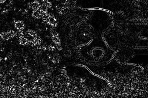
Edge detection works on one brightness per pixel. An inner product with the standard luminance weights combines the three colours:
grey←small+.×[0.2990.5870.114]•image grey
A Laplacian kernel responds where brightness changes sharply. 3 3↕grey gives the 3×3 neighbourhood of every pixel that has one:
k←[0101¯41010]win←33↕grey⍴win
[98 148 3 3]ₓ
Multiplying each neighbourhood by the kernel and summing over the last two axes gives an edge strength for each pixel. Its absolute value shows the edges as bright lines: